Triggers
Open it: Triggers · under Agents in the console menu.
A trigger starts something on its own. It listens on one source (a web address, a schedule, an ADB topic or a platform event) and, each time it fires, sends to one or more targets: a flow, an agent, or a URL. What each target gets is a mapping, written in jq, checked on sample events and approved before it is used.
New trigger opens a five-step form: Details, On, Send, YAML, Test. The example below sends refund requests from a shop to the help-desk agent from the Quick start.
1. Details
Section titled “1. Details”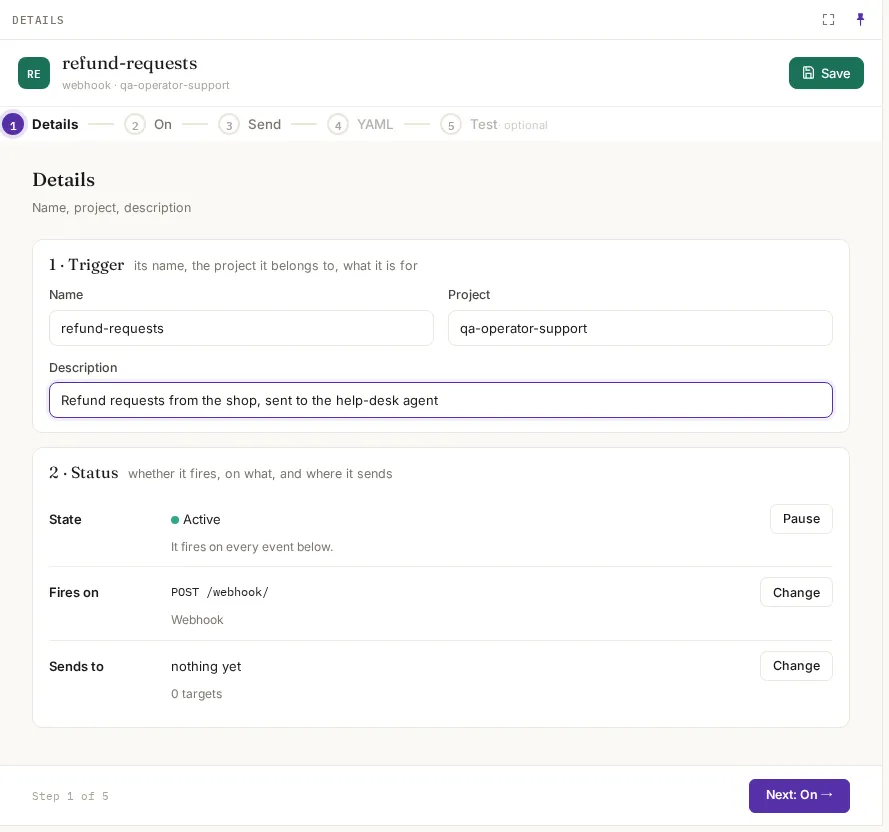
| Field | What it means | Example |
|---|---|---|
| Name | What it is, in a few words. Used in the conversation name when no mapping gives one | refund-requests |
| Project | The project it belongs to. Its members can see and change it, by their roles | qa-operator-support |
| Description | What it is for | Refund requests from the shop, sent to the help-desk agent |
| State | Active: it fires. Pause: it doesn’t, until you resume it | Active |
2. On: what fires it
Section titled “2. On: what fires it”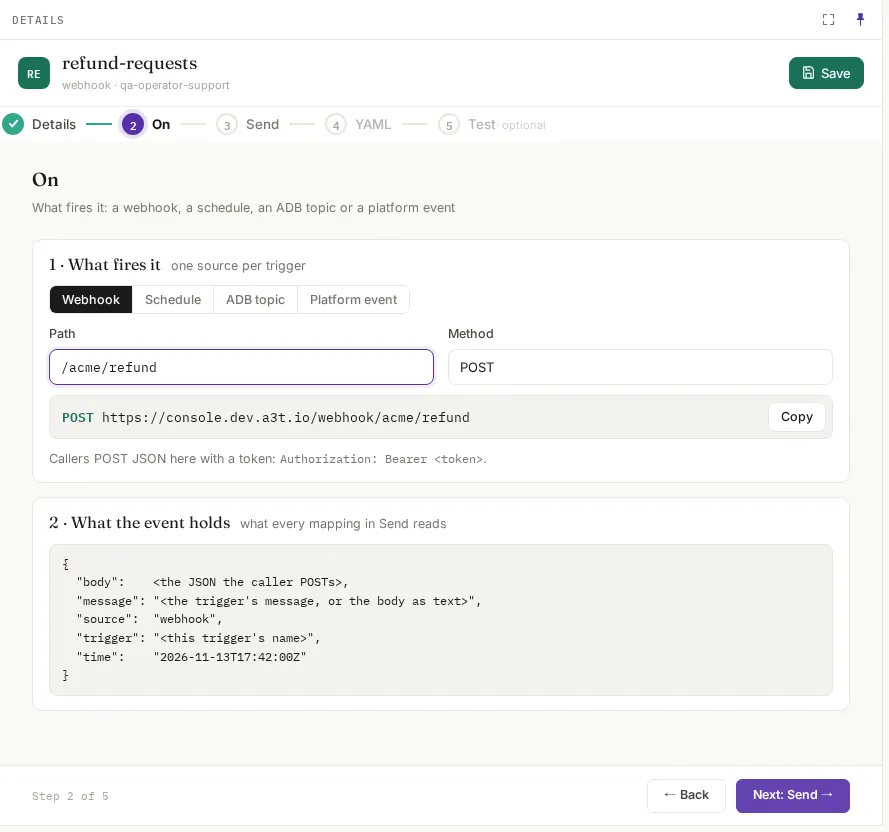
| Source | Fields | When it fires |
|---|---|---|
| Webhook | Path (e.g. /acme/refund) | When a caller POSTs JSON to https://<your A3T address>/webhook<path>. A token (Authorization: Bearer <token>) is optional: with one, the runs act as that person; without one, as the trigger service. A path with no trigger answers 404 |
| Schedule | A cron expression (e.g. */5 * * * *, every five minutes), a time zone (e.g. UTC) and an optional message, which becomes the event’s message | On every tick. Each tick runs each target once, even with several copies of FlowR |
| ADB topic | The ADB resource (e.g. a3t/adb) and the topic (e.g. orders) | For each message published to the topic |
| Platform event | The event type (e.g. system.workflow.completed) | When A3T emits that event |
Every source makes the same event, and that is what the mappings read:
{ "body": <the JSON the caller POSTs, the tick, the topic message, or the event>, "message": "<the trigger's message, or the body as text>", "source": "webhook", "trigger": "<this trigger's name>", "time": "2026-11-15T11:55:00Z"}3. Send: targets and mappings
Section titled “3. Send: targets and mappings”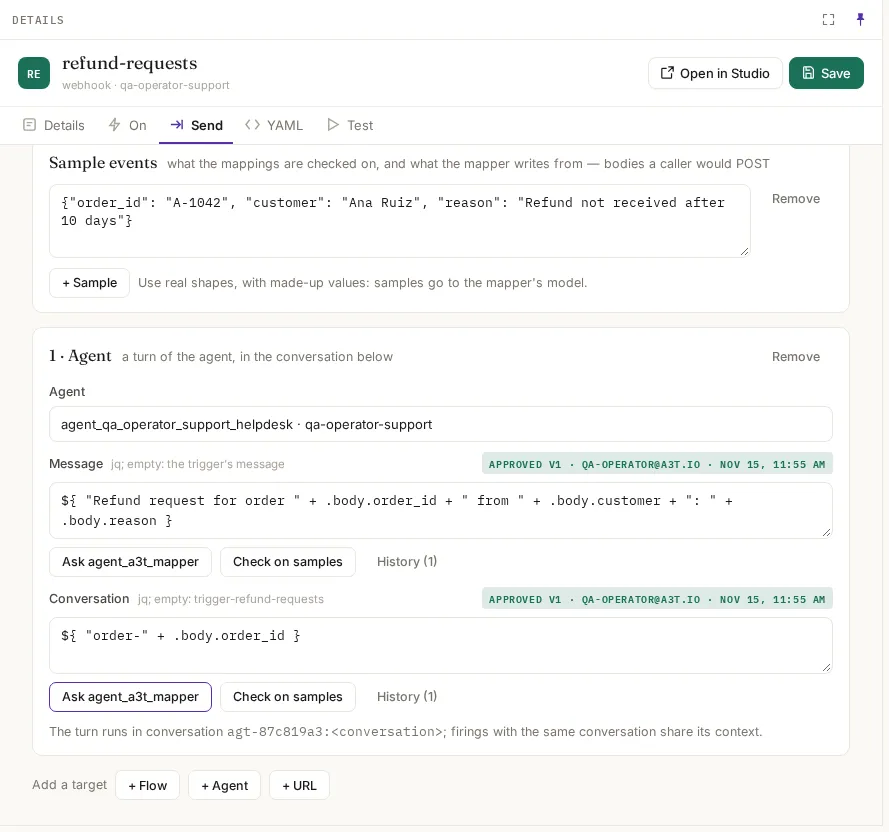
Sample events come first: bodies a caller would send, with made-up values. Mappings are checked on them, and the mapper agent writes from them, so use real shapes. Then add targets:
| Target | What it runs | Its mappings |
|---|---|---|
| + Agent | A turn of the agent | Message: what the agent is told (empty: the trigger’s message). Conversation: which conversation the turn is in (empty: trigger-<name>). Firings with the same conversation continue it |
| + Flow | A run of the flow | Input: the flow’s input, shaped to its input schema |
| + URL | Posts the event on to another service, at the URL you give | None: the event is sent as it is |
A mapping is a jq expression over the event, wrapped as ${ … }. You can write it, or click Ask agent_a3t_mapper to have A3T’s mapping agent propose one from your samples and the target. Either way:
- Check on samples runs it on every sample, exactly as a firing would, and shows the result.
- Approve this mapping records it as an approved version, with who approved it and when. History lists earlier versions.
- When the trigger fires, only the approved jq runs. A hand-written or proposed mapping that isn’t approved is never used.
The example’s mappings:
| Mapping | jq | On the sample, gives |
|---|---|---|
| Message | ${ "Refund request for order " + .body.order_id + " from " + .body.customer + ": " + .body.reason } | Refund request for order A-1042 from Ana Ruiz: Refund not received after 10 days |
| Conversation | ${ "order-" + .body.order_id } | order-A-1042 |
4. YAML
Section titled “4. YAML”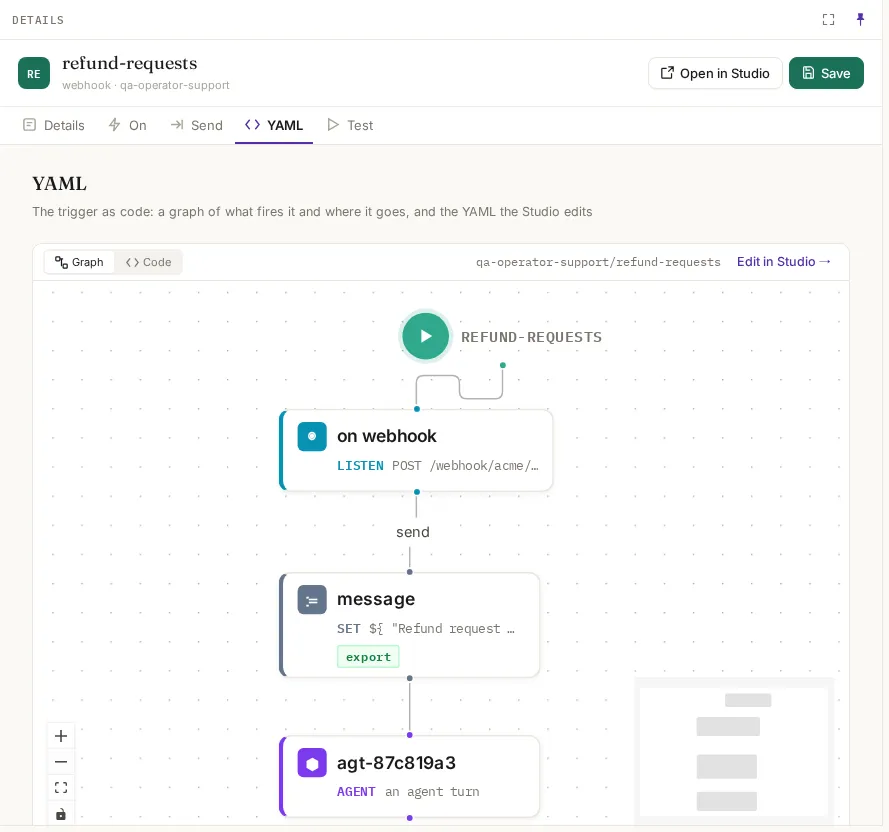
The trigger as code. Graph draws what fires it and where it goes; Code is the YAML Studio edits:
name: refund-requestsproject: qa-operator-supportdescription: Refund requests from the shop, sent to the help-desk agentenabled: trueon: webhook: path: /acme/refund method: POSTsend: - agent: agt-87c819a3 message: '${ "Refund request for order " + .body.order_id + " from " + .body.customer + ": " + .body.reason }' conversation: ${ "order-" + .body.order_id }5. Test
Section titled “5. Test”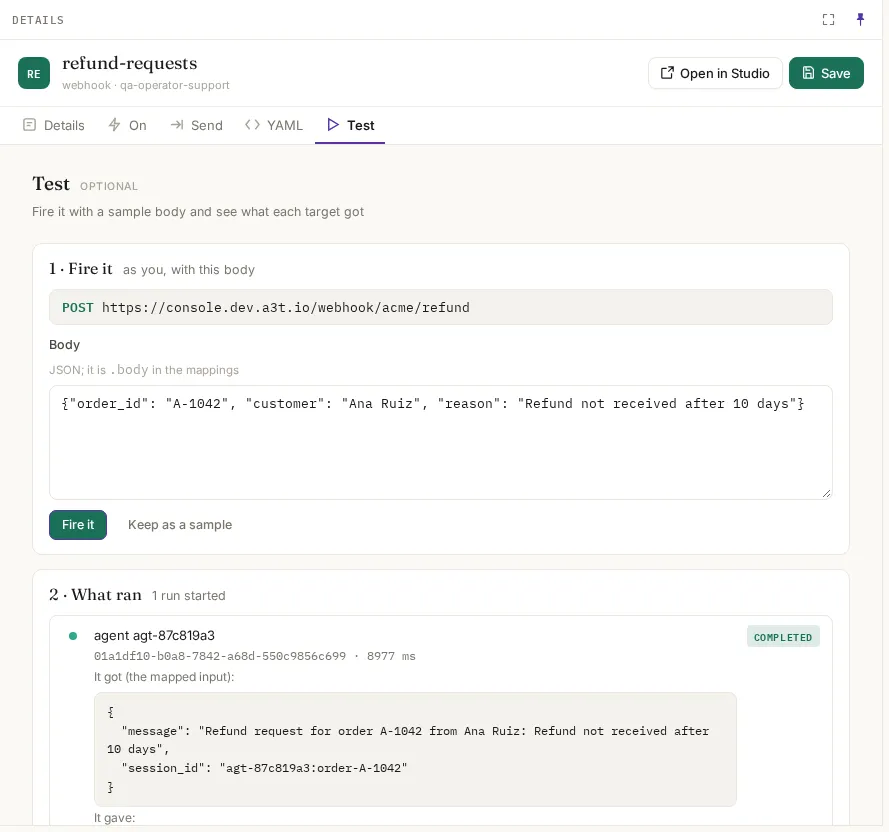
Fire it sends the body to the trigger as you, exactly as a caller would, and follows each run it starts:
- It got (the mapped input): what the target received after the mappings ran.
- It gave: the target’s output.
- The run’s id and time: open it in Executions for every step.
Keep as a sample adds the body to the samples. The example’s test:
// It got (the mapped input):{ "message": "Refund request for order A-1042 from Ana Ruiz: Refund not received after 10 days", "session_id": "agt-87c819a3:order-A-1042"}A run started by a trigger shows Started by Trigger refund-requests in Executions, with a link back to it.
Calling a webhook trigger
Section titled “Calling a webhook trigger”curl -X POST "$A3T_URL/webhook/acme/refund" \ -H "Authorization: Bearer $TOKEN" \ -H "Content-Type: application/json" \ -d '{"order_id": "A-1042", "customer": "Ana Ruiz", "reason": "Refund not received after 10 days"}'The answer says which targets it reached and the runs it started; a mapping that failed or a target that refused is named with the reason.