Files
Open it: Files · first item under Knowledge & data in the console menu.
Files connects cloud storage and file servers to A3T, so agents and flows can read and write files in them, and you can browse what is there. Each one is a storage resource in a project, used by name like any other resource.
New storage
Section titled “New storage”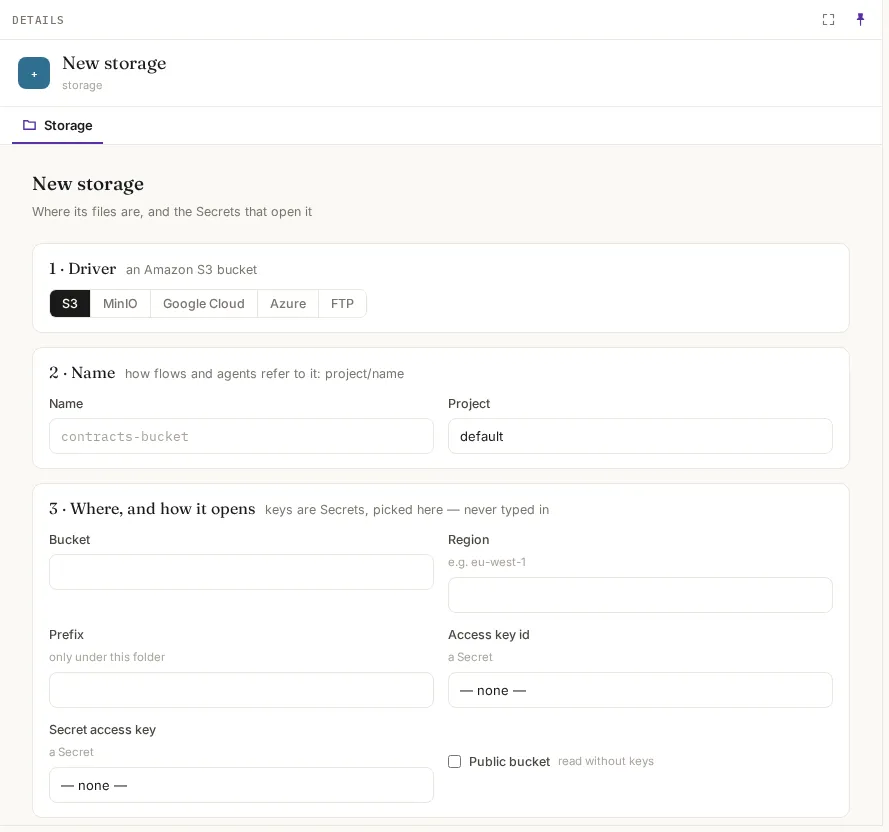
1 · Driver: where the files are. 2 · Name and Project: flows and agents refer to it as <project>/<name>. 3 · Where, and how it opens: the driver’s fields. Keys are always Secret resources, picked from a list; they are never typed into the storage itself.
| Driver | Fields (empty means) |
|---|---|
| S3 (an Amazon S3 bucket) | Bucket; Region (e.g. eu-west-1); Prefix (only under this folder; empty: the whole bucket); Access key id and Secret access key (Secrets); Public bucket (read without keys) |
| MinIO (an S3-compatible bucket) | Endpoint (e.g. http://minio.example:9000); Bucket; Region (us-east-1 if unsure); Prefix; Access key and Secret key (Secrets) |
| Google Cloud | Bucket; Prefix; Service account key (a Secret holding the key JSON); Public bucket |
| Azure (a Blob container) | Storage account; Container; Prefix; Access key (a Secret) |
| FTP | Host; Port (21); User (empty: anonymous); Password (a Secret); Root directory (empty: /) |
Create storage saves it. Create the Secrets first, in Resources.
A storage’s tabs
Section titled “A storage’s tabs”| Tab | What it shows |
|---|---|
| Overview | Where it points, which Secrets open it, and who uses it |
| Files | Its contents, through its own driver: a bucket’s folders and files, or an FTP server’s directories. Open a file to see its first 64 KiB |
| Used by | The agents, flows, canvases and triggers that name it |
| Configuration | Its driver’s settings; credentials as Secret references only |